Fulfilling a deal
Process to add discounts to a deal
When a deal has been reserved for an order, the Future Ordering backend will send events to Loyalty Integration for every change made to the order, informing that a change has occurred. The sequence diagram for this process is shown below.
Batch fulfillment required event
Use order.deal.batch_fulfillment_required for fulfillment processing. The dealIds array contains the deal IDs provided with the order version.
Example for a batch fulfillment required event:
{
  "specversion": "1.0",
  "data": {
    "tenantId": "my_tenant",
    "key": "key-for-my-own-integration",
    "orderVersionId": "3",
    "orderId": "ebuvUDP0i8i",
    "dealIds": [
      "a0e34dd7-1052-4918-9896-2930d4c121e1",
      "f0d19976-cb63-4b8b-919b-92e798e303cc"
    ]
  },
  "dataContentType": "application/json",
  "id": "ac76bae2-5b0c-48ae-a308-c04932a06742",
  "source": "https://api.futureordering.com",
  "time": "2024-05-21T19:41:37.3430427+00:00",
  "type": "com.futureordering.order.deal.batch_fulfillment_required"
}
If the orderVersionId property is lower than the current version of the order, Future Ordering sends the batch_fulfillment_required event to Loyalty Integration. This event is triggered every time a customer adds a product to their basket or makes a significant change to their order, such as changing the order type, collection type, or desired ready time.
To respond to this batch_fulfillment_required event, update the deals listed in dealIds with one of the PATCH endpoints. Include the current order versionId and isFulfilled=true in the PATCH request. The event gives the integration an opportunity to add discounts to the order. If the integration does not provide updates for the current orderVersionId within the fulfillment timeout of 30 seconds, Future Ordering either continues without discounts or fails the order, depending on the tenant configuration. Keep the time from event to performed actions as low as possible rather than treating the timeout as a budget, since a guest cannot pay until the loyalty integration has updated Future Ordering. See Deal timeouts and fallbacks for the full behaviour.
Update deal APIs
The following examples show how to update a deal with discounts after a batch_fulfillment_required event.
Example: Given that the user has bought 2 Taco Sauces and 1 Future Burger and the loyalty system has a discount that gives 50% off if the user buys one Future Burger and one Taco Sauce.
When a batch_fulfillment_required event is received, first fetch the order with:
- GET
/orders/{order-id}/
Below is the most central part of the order response containing versionId and items[].
{
  "versionId" : "3",
  "items": [
    {
      "subItemType": "none",
      "isContainer": false,
      "type": "menuItem",
      "menuItemId": "10",
      "title": "Taco Sauce",
      "quantity": 2,
      "configItems": [],
      "price": {
        "amount": 500,
        "isVatIncluded": true,
        "vat": [
          {
            "type": "12%",
            "percent": 12
          }
        ]
      },
      "id": "c0c88723-3a99-404b-b4e2-27815fe0b335",
      "unitIds": {
        "c0c88723-3a99-404b-b4e2-27815fe0b335": [
          "c0c88723-3a99-404b-b4e2-27815fe0b335.0",
          "c0c88723-3a99-404b-b4e2-27815fe0b335.1"
        ]
      }
    },
    {
      "subItemType": "none",
      "isContainer": false,
      "type": "menuItem",
      "menuItemId": "20",
      "title": "Future Burger",
      "quantity": 1,
      "configItems": [],
      "price": {
        "amount": 1000,
        "isVatIncluded": true,
        "vat": [
          {
            "type": "12%",
            "percent": 12
          }
        ]
      },
      "id": "b1c88723-3a99-404b-b4e2-27815fe0b443",
      "unitIds": {
        "b1c88723-3a99-404b-b4e2-27815fe0b443": [
          "b1c88723-3a99-404b-b4e2-27815fe0b443.0"
        ]
      }
    }
  ]
}
Using one of the PATCH endpoints, discounts can be applied. This example uses the following PATCH request, where several deals can be updated in one request. Note that order-id in the PATCH path is the order-id from the event.
- PATCH
/orders/{order-id}/deals
Depending on how the discounts are being added to the deal - the discounts will be shown in different ways in UI. In this first example the discount will be shown with the Future Burger in the UI.
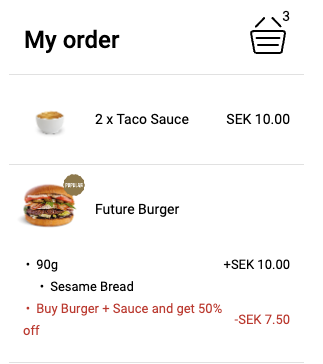
The following PATCH request should be sent to achieve the example above.
{
  "a0e34dd7-1052-4918-9896-2930d4c121e1": {
    "isFulfilled": true,
    "visibility": "notShown",
    "title": {
      "translations": {
        "en-GB": "Changed title",
        "default": "Summer deal"
      }
    },
    "name": "internal name",
    "orderVersionId": "3",
    "discounts": [
      {
        "title": {
          "translations": {
            "en-GB": "British English translation",
            "default": "Buy Burger + Sauce and get 50% off"
          }
        },
        "relatedItemIds": [
          "c0c88723-3a99-404b-b4e2-27815fe0b335",
          "b1c88723-3a99-404b-b4e2-27815fe0b443"
        ],
        "relatedItemUnitIds": [
          "c0c88723-3a99-404b-b4e2-27815fe0b335.0",
          "b1c88723-3a99-404b-b4e2-27815fe0b443.0"
        ],
        "amounts": [
          {
            "discountedItemId": "b1c88723-3a99-404b-b4e2-27815fe0b443",
            "discountedItemUnitId": "b1c88723-3a99-404b-b4e2-27815fe0b443.0",
            "amount": 750,
            "vat": [
              {
                "type": "12.5",
                "percent": 12.5
              }
            ]
          }
        ],
        "mappingDetails": {
          "externalDiscountId": "101"
        }
      }
    ]
  }
}
The second example shows how the discounts can be divided to be shown both with the Taco Sauce and with the Future Burger in the UI. The discount is split between Burger and Taco Sauce.
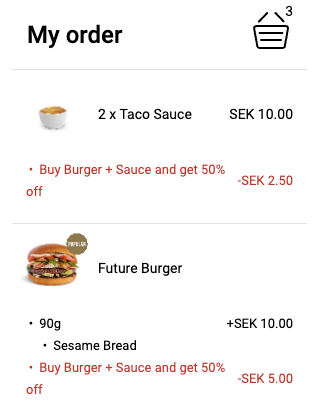
The following PATCH request should be sent to achieve the example above.
{
  "a0e34dd7-1052-4918-9896-2930d4c121e1": {
    "isFulfilled": true,
    "title": {
      "translations": {
        "en-Gb": "Changed title",
        "default": "Buy Burger + Sauce and get 50% off"
      }
    },
    "name": "internal name",
    "orderVersionId": "3",
    "discounts": [
      {
        "title": {
          "translations": {
            "en-Gb": "British English translation",
            "default": "Buy Burger + Sauce and get 50% off"
          }
        },
        "relatedItemIds": [
          "c0c88723-3a99-404b-b4e2-27815fe0b335",
          "b1c88723-3a99-404b-b4e2-27815fe0b443"
        ],
        "relatedItemUnitIds": [
          "c0c88723-3a99-404b-b4e2-27815fe0b335.0",
          "b1c88723-3a99-404b-b4e2-27815fe0b443.0"
        ],
        "amounts": [
          {
            "discountedItemId": "c0c88723-3a99-404b-b4e2-27815fe0b335",
            "discountedItemUnitId": "c0c88723-3a99-404b-b4e2-27815fe0b335.0",
            "amount": 250,
            "vat": [
              {
                "type": "12.5",
                "percent": 12.5
              }
            ]
          },
          {
            "discountedItemId": "b1c88723-3a99-404b-b4e2-27815fe0b443",
            "discountedItemUnitId": "b1c88723-3a99-404b-b4e2-27815fe0b443.0",
            "amount": 500,
            "vat": [
              {
                "type": "12.5",
                "percent": 12.5
              }
            ]
          }
        ],
        "mappingDetails": {
          "externalDiscountId": "101"
        }
      }
    ]
  }
}
unitIds represent specific quantity units of an item. If an item with ID c0c88723-3a99-404b-b4e2-27815fe0b335 has quantity 3, that item has 3 units and 3 unitIds.
relatedItemIdsCan be used to ensure that the same item isn't part of several discounts.relatedItemUnitIdsCan be used to ensure that the same item unit isn't part of several discounts.
RelatedItemIds and relatedItemUnitIds are required to be populated with itemIds that exist in the order.
amounts[].discountedItemIdThis item will receive this amount of discountamounts[].discountedItemUnitIdThis specific unit will receive this amount of discount
DiscountedItemIds and DiscountedItemUnitIds are required to be populated with itemIds that exist in the order.
If a discount should apply to both Taco Sauces in the example - each unit must have one amount for the discount. This is needed to get correct VAT calculations.
mappingDetails on the discount object can consist of any generic property that may be needed by the loyalty integration itself. But there is one property that is required to be set by the loyalty integration if Future Ordering Stsgen2 integration will send the order to the POS and this property is the externalDiscountId.
mappingDetails.externalDiscountIdrepresents a preconfigured discountId in Simphony that Future Ordering Stsgen2 Integration must use when sending an order with discounts to Stsgen2.
Here is an example when 2 Taco sauces get 50% off for each unit.
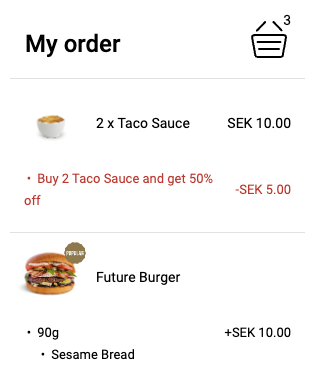
{
  "a0e34dd7-1052-4918-9896-2930d4c121e1": {
    "isFulfilled": true,
    "title": {
      "translations": {
        "en-Gb": "Changed title",
        "default": "Buy 2 Taco Sauce and get 50% off"
      }
    },
    "name": "internal name",
    "orderVersionId": "3",
    "discounts": [
      {
        "title": {
          "translations": {
            "en-Gb": "British English translation",
            "default": "Buy 2 Taco Sauce and get 50% off"
          }
        },
        "relatedItemIds": [
          "c0c88723-3a99-404b-b4e2-27815fe0b335"
        ],
        "relatedItemUnitIds": [
          "c0c88723-3a99-404b-b4e2-27815fe0b335.0",
          "c0c88723-3a99-404b-b4e2-27815fe0b335.1"
        ],
        "amounts": [
          {
            "discountedItemId": "c0c88723-3a99-404b-b4e2-27815fe0b335",
            "discountedItemUnitId": "c0c88723-3a99-404b-b4e2-27815fe0b335.0",
            "amount": 250,
            "vat": [
              {
                "type": "12.5",
                "percent": 12.5
              }
            ]
          },
          {
            "discountedItemId": "c0c88723-3a99-404b-b4e2-27815fe0b335",
            "discountedItemUnitId": "c0c88723-3a99-404b-b4e2-27815fe0b335.1",
            "amount": 250,
            "vat": [
              {
                "type": "12.5",
                "percent": 12.5
              }
            ]
          }
        ],
        "mappingDetails": {
          "externalDiscountId": "101"
        }
      }
    ]
  }
}
The parameter isFulfilled represents an action that the API should try to complete. If all deals have this parameter set to true the API will try to fulfill and validate the deals if that passes the API will attempt to apply discounts from each of the deals. Note that all deals have to pass validation for discounts to be applied.
If the parameter isFulfilled is true, then orderVersionId must match the current version of the order. The current orderVersionId can be retrieved from the Orders API: GET /orders/{order-id}. The response includes versionId, which can be used as orderVersionId.
{
  "versionId": "6"
}
If orderVersionId is lower than the current order version, the Deals API responds with the following payload:
{
  "innerCode": "order.deal.version-mismatch",
  "outerCode": 400,
  "data": null,
  "code": "deal.generic.bad-request",
  "message": "OrderVersionId is not matching the current version of the order fulfillment is not possible",
  "innerError": null
}
If the PATCH request is successful and with the property isFulfilled: true the order should have discounts applied.
Example response:
{
  "statusCode": "successful",
  "message": "Patched",
  "innerCode": null,
  "successful": true,
  "outerCode": 200
}
innerCode values that can occur for the PATCH request when outerCode is 400 Bad Request:
order.deal.version-mismatch: Order version ID does not match the current order version ID. A lower order version ID was provided.order.generic.not.found: Order is not found.order.deal.property-missing: Fulfillment of deal is not possible without order version id.order.deal.annulled: Deal is annulled and does not accept changes.order.deal.invalid-order-version: An invalid format for order version id is given, or the order version is higher than the current order version.order.deal.set-discount-unavailable: Order does not accept discounts and order cannot be updated for current order version.
There are two options when building functionality for batch_fulfillment_required events.
-
Use each event's
dealIdsandorderVersionIdwhen executing aPATCHrequest. If aPATCHrequest fails, the integration waits for the next event before calculating discounts for the current order version. -
When a
batch_fulfillment_requiredevent is sent to the loyalty integration, fetch the latest order to retrieve itsversionId. This keeps discount calculations on the latest order version. For example, if the latest order version is4, the integration can disregard a later event withorderVersionId3. Use an order lock to prevent concurrent processing for the same order.